
"This turns your computer into your own search engine that is far more powerful than current leading search engines today and is directed only by you".
While you use MyLiveSearch in the same way as any other search engine, the way it operates is fundamentally different.
While the historic search engines use large external physical systems, MyLiveSearch is an end user solution. Historic systems rely on banks of computers working on an old and limited informational model; our muscle is our spiral programming that goes much deeper and further.
1. Instead of just looking at the surface of websites or potentially misleading clues as to what they might contain such as page titles and meta tags, MyLiveSearch goes right into their detailed content. Our technology has the power to pull apart hundreds of websites in seconds to find richly relevant information that you could not find in hundreds of hours. Our technology is actually able to do this better than most of the sites themselves.
Much better search results, in much less time is the outcome you can expect.
2. When it finds highly relevant content within a site, MyLiveSearch uses that as a leap forward to find more and more sites with this information from one site to the next in milliseconds. We call this the spiral process, such as links to run searches on other sites.
The result for you is an explosion of highly relevant search results that takes place in a few seconds. Given sufficient computer power, our program has the theoretical ability to drive this process to cover the entire web.
You start by using MyLiveSearch in exactly the same way as a conventional search engine by entering your search request.
Starting points:
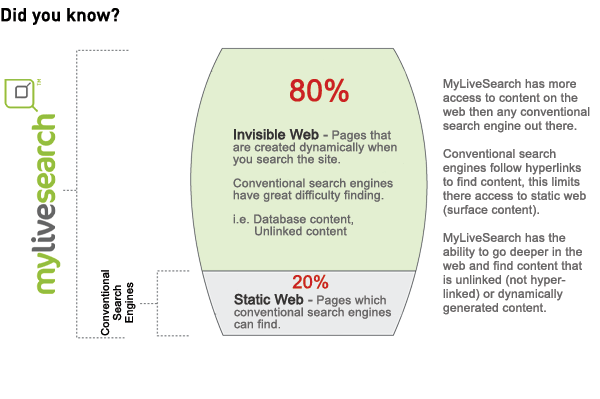
MyLiveSearch spiral technology works by either using an existing search engine of your choice or a combination of favourite websites (bookmarks). By querying these "starting points" of interest, the spiral process begins onwards from your computer finding information that is available now, dynamic (invisible) pages and fringing websites.
Once it has a starting point, MyLiveSearch goes to work sorting through thousands of results in a few seconds to deliver the specific results you are looking for.
As you discover sites that are helpful or relevant to areas of your interest, you can bookmark these under their topic ie. If you had an interest in Qantas shares you may bookmark MyLiveSearch to use www.theage.com.au, www.asx.com.au and www.financialreview.com.au as starting points. The program will then start looking from these sites and spiral outward finding relevant information in other sites from there.
The MyLiveSearch Beta installs in seconds. Supported browsers are Internet Explorer (6.0 or higher) or Firefox on Windows XP or Windows Vista.